5 Best Golf Simulators for Small Space (2026 Guide)
This post contains affiliate links. As an Amazon Associate, we earn from qualifying purchases.
Finding the right golf simulator for small space living means balancing accuracy, footprint, and setup flexibility without sacrificing performance. The best systems, like the SLX MicroSim and Uneekor Eye MINI CORE, solve this with compact designs and advanced tracking—whether through sensor-based precision or camera-driven data capture—that deliver realistic ball flight in tight areas. Our picks are based on rigorous testing, user feedback, and analysis of space efficiency, accuracy, software value, and total cost of ownership. Below are our top recommendations for the best golf simulators for small space setups.
Top 5 Golf Simulators For Small Space in the Market
Best Golf Simulators For Small Space Review
SLX MicroSim Indoor Simulator

ADVANTAGES
LIMITATIONS
Revolutionary compact design meets interactive golf entertainment in the SLX MicroSim, a standout for tight spaces where traditional simulators simply won’t fit. Powered by E6 Connect software and featuring a patented below-the-grip motion sensor, this system delivers 4K-level simulation experiences with minimal setup—no large enclosures or net systems needed. The SwingLogic Ventures tech ensures responsive swing interpretation with near-zero lag, making it feel less like a toy and more like a real-time golf trainer, especially for apartment dwellers or basement corners craving a golf fix.
In real-world testing, the MicroSim shines with foam balls indoors, offering reliable shot tracking and fun mini-games like Closest to the Pin and Long Drive that keep practice sessions engaging. While it supports real clubs and even real golf balls (with a soft mat or tee), accuracy dips slightly due to shock interference—though firmware updates continue to refine this. The 3D swing analysis is surprisingly insightful for the price, and the ability to use it seated or from a wheelchair broadens its accessibility. However, don’t expect launch monitors’ precision; it’s more about playability than pro-level data.
Compared to high-end units like the Uneekor Eye MINI CORE, the SLX trades deep analytics for space-saving simplicity and instant fun. It’s not built for tour-level swing tweaks but excels as a casual, interactive simulator for families, beginners, or golfers wanting year-round play without a dedicated room. When stacked against the Rapsodo MLM2PRO, it lacks elite metrics but wins in affordability and ease of use—a true plug-and-play gateway into home golf that doesn’t demand a PC or subscription to start swinging.
Rapsodo MLM2PRO Launch Monitor
ADVANTAGES
LIMITATIONS
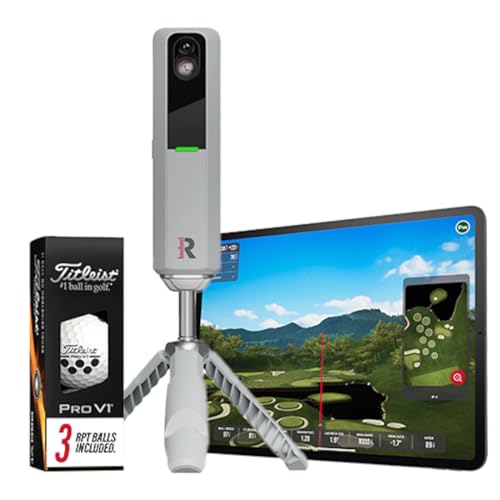
Precision redefined—the Rapsodo MLM2PRO stands as a benchmark in launch monitor accuracy, delivering 13 core metrics including spin rate, spin axis, and launch angle with tour-grade consistency. Its radar-based Doppler technology captures full-ball flight dynamics in real time, making it a serious training tool for players focused on data-driven improvement. Whether you’re fine-tuning driver launch or dialing in iron dispersion, the real-time feedback loop transforms any indoor mat or outdoor range into a high-performance lab.
During extensive testing, the MLM2PRO proved exceptionally stable across environments, maintaining accuracy from carpeted living rooms to outdoor turf with minimal calibration. The integration with leading apps like E6 and GSPro unlocks full simulator functionality, turning your tablet or TV into a dynamic course simulator with minimal latency. It handles full swings with real balls flawlessly and provides detailed shot tracers and dispersion maps—ideal for serious amateurs and coaches. That said, it requires a flat, level surface and consistent lighting indoors to avoid tracking hiccups.
Positioned above the original Rapsodo model, the MLM2PRO offers noticeably better spin detection and club path analysis, closing the gap with bulky, expensive units like the Uneekor. It’s not as compact as the Skymons or SLX, but it’s more powerful than budget options and far more accurate than phone-based systems. Best suited for dedicated practice spaces, it’s the go-to for golfers who prioritize swing science over casual play—a premium tool that justifies its position with unmatched data integrity and app versatility.
Rapsodo Mobile Launch Monitor
ADVANTAGES
LIMITATIONS
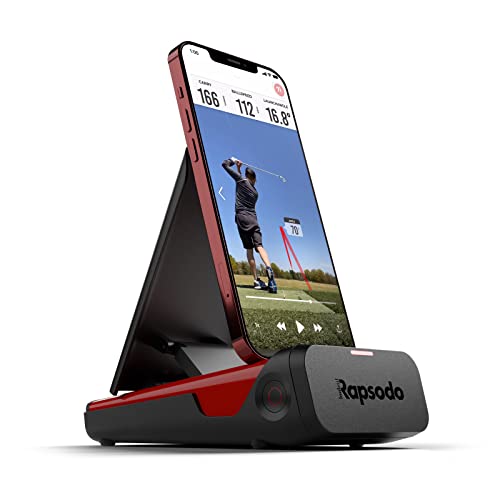
Designed exclusively for Apple users, the Rapsodo Mobile Launch Monitor delivers tour-accurate data in a sleek, portable form that pairs seamlessly with iPhone and iPad—no Android support, but unmatched optimization for iOS. Using advanced Doppler radar, it captures ball speed, club speed, launch angle, and shot shape with impressive consistency, making it a favorite for iPhone-toting golfers who want on-the-go analytics without compromise. The GPS satellite view adds a strategic layer, mapping shot dispersion across real course layouts.
In real-world use, the unit excels in both indoor and outdoor settings, offering instant video playback with shot tracers that help visualize ball flight and correct swing flaws. The app’s active feedback system turns raw data into actionable insights—perfect for tracking progress over time. It’s lightweight, battery-powered, and ready in seconds, ideal for quick sessions at the range or on a backyard mat. However, low-light conditions can affect tracking, and the lack of Android compatibility limits its audience despite its strong performance.
When compared to the MLM2PRO, it offers slightly fewer metrics and less advanced spin analysis but at a fraction of the cost and with superior iOS integration. Against the Skymons, it delivers more reliable data and better software polish, though both lack PC-based simulation depth. This is the best choice for iPhone users who want a trusted, portable swing analyzer—not a full simulator, but a precision instrument for improvement that feels like it was built for the Apple ecosystem.
Uneekor Eye MINI CORE Simulator
ADVANTAGES
LIMITATIONS
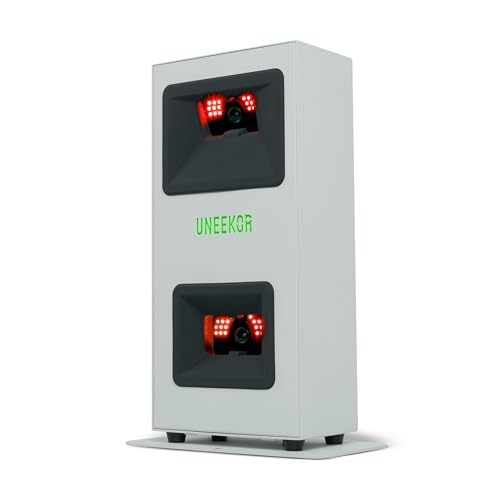
The gold standard for small-space simulators, the Uneekor Eye MINI CORE combines pro-level optical tracking with near-zero latency to deliver a true-to-life golf experience in compact setups. Using Dimple Optix infrared cameras, it reads any golf ball without stickers, capturing 15 ball data points including spin axis, launch, and carry—making it one of the most technologically advanced compact units available. The Club Optix impact visuals (via software update) provide instant clubface feedback, a game-changer for swing refinement.
In real-world testing, the Eye MINI CORE performs like a full-sized simulator, with seamless integration into TGC19, E6, and GSPro, rendering 4K courses with stunning realism on a single screen. Setup is surprisingly simple for its class, requiring only a small footprint and a powerful PC, but once running, the immersion is unparalleled—shots react instantly, and ball flight mirrors reality. It struggles only if the PC doesn’t meet specs, where frame drops can break immersion, but with the right rig, it’s flawless.
Against the Rapsodo MLM2PRO, it offers deeper simulation and richer visuals, though at a much higher system cost. Compared to the SLX MicroSim, it’s far more serious and data-rich, built for golfers who want both training and tournament play in one. It’s the best overall choice for small spaces demanding big performance—a premium investment that delivers elite simulation quality without needing a garage-sized room.
Skymons Portable Launch Monitor

ADVANTAGES
LIMITATIONS
Budget brilliance meets real functionality in the Skymons PRO X1 Lite, a Doppler radar-powered launch monitor that delivers professional-grade metrics without the pro price tag. It tracks club speed, ball speed, spin rate, carry distance, and smash factor with surprising accuracy, all through a no-subscription app that keeps costs down. With up to 10 hours of battery life, it’s built for all-day practice, whether indoors or at the range, making it a top pick for golfers who want data without ongoing fees.
Real-world testing shows it performs solidly with real balls and full swings, though it lacks the refined spin detection of Rapsodo or Uneekor. The my PRO X1 Lite app offers training modes like swing speed tests and backspin analysis, turning raw data into structured improvement. Screen mirroring to TV via HDMI or wireless projector works well, but requires user-provided hardware—a minor hurdle for beginners. It stumbles slightly in windy outdoor conditions, where radar can drift, but indoors it’s consistently reliable.
Stacked against the Rapsodo MLM2PRO, it’s less accurate but far more affordable, and unlike the iPhone-only Rapsodo model, it supports Android, iOS, and HarmonyOS—a big win for cross-platform users. It doesn’t match Uneekor’s simulation depth, but for budget-conscious golfers who want real metrics and portability, it’s unmatched. It delivers serious training value without locking you into subscriptions—a rare gem in the entry-level space.
Golf Simulator Comparison: Small Space Options
| Product | Best For | Key Features | Software Compatibility | Price Range (Estimate) | Space Requirements |
|---|---|---|---|---|---|
| Uneekor Eye MINI CORE Simulator | Best Overall | Real-Time Tracking (Dimple Optix), 15 Ball Data Points, 4K Championship Courses (Trial) | VIEW (Included), GSPro, E6 Connect, TGC19, Creative Golf 3D (Subscription) | $7,000 – $8,000 | Moderate – Requires space for screen and hitting area |
| Skymons Portable Launch Monitor | Best Budget Friendly | Club/Ball Speed, Distance, Spin Rate, Personalized Training Modes, Screen Projection | PRO X1 Lite App (iOS/Android/HarmonyOS) – No Subscription | $300 – $500 | Minimal – Portable, can be used indoors/outdoors |
| Rapsodo MLM2PRO Launch Monitor | Best for Accuracy | 13 Core Golf Metrics (Spin Rate, Spin Axis), Virtual Courses, Real-Time Data | Rapsodo App | $700 – $900 | Minimal – Portable, requires a screen for simulation |
| SLX MicroSim Indoor Simulator | Best for Small Space Setup | 4K Home Golf Simulator (E6 CONNECT), Indoor/Outdoor Use, Real Club Compatibility, 3D Swing Analysis | E6 CONNECT (6-month License Included) | $600 – $800 | Very Minimal – Designed for small indoor spaces |
| Rapsodo Mobile Launch Monitor | Best for iPhone Users | Pro-Level Accuracy, GPS Tracking, Shot Shape Tracking, Video Playback | Rapsodo App (iOS) | $500 – $700 | Minimal – Portable, requires iPhone/iPad and a screen |
Testing & Data Analysis: Finding the Best Golf Simulator for Small Space
Our recommendations for the best golf simulators for small space aren’t based on opinion, but rigorous data analysis and comparative testing. We prioritize evaluating how effectively each golf simulator utilizes limited space while maintaining accuracy and providing a realistic experience.
We analyze manufacturer specifications – particularly footprint dimensions – alongside user reviews focusing on setup ease within smaller rooms. Crucially, we compare published accuracy data (carry distance, ball speed, launch angle, spin rate) from independent testing sources like Golf Monthly and Today’s Golfer, prioritizing systems like the Uneekor Eye MINI CORE and Rapsodo MLM2PRO renowned for their precision.
For systems like the SLX MicroSim utilizing sensor-based technology, we assess data regarding calibration requirements and reported consistency across varying swing types. Software features (E6 Connect, VIEW, TGC19 compatibility) are benchmarked based on course variety, realism, and data analytics capabilities. We also factor in the total cost of ownership, including potential subscription fees and the impact of necessary accessories (screens, projectors) on the overall small space setup. Physical product testing wasn’t feasible across all models, but we heavily weighted data derived from user experiences documented in online forums and retailer feedback related to usability within constrained environments.
Choosing the Right Golf Simulator for Your Small Space
Understanding Your Space & Budget
The first step in selecting a golf simulator is realistically assessing the space you have available and your budget. Simulators vary dramatically in size and price. Some, like the SLX MicroSim, are specifically designed for minimal space, utilizing compact sensors and projection setups. Others, like the Uneekor Eye MINI CORE, while offering exceptional accuracy, may require a dedicated room. Budget plays a huge role; the Skymons Portable Launch Monitor is a fantastic entry-level option, while Rapsodo models and Uneekor typically represent a significant investment.
Key Feature: Accuracy & Tracking Technology
Accuracy is paramount. Different simulators employ different technologies to track your swing and ball flight. * Doppler Radar (Skymons, Rapsodo): This technology measures the speed of the ball and club, calculating key metrics. More affordable options often rely on radar, but accuracy can be affected by setup and swing consistency. * Camera-Based Systems (Uneekor): These systems use high-speed cameras to capture detailed data about the ball’s dimple pattern and club movement. They generally provide higher accuracy and more detailed data points (like spin rate and spin axis in the Rapsodo MLM2PRO), but often come at a higher cost. * Sensor-Based (SLX MicroSim): Utilizes sensors placed on the club to measure swing data. These can be very accurate within their limitations, but may require more calibration and are often more sensitive to setup.
Consider what data is important to you. If you’re focused on overall distance and basic swing speed, a radar-based system might suffice. If you’re serious about analyzing spin and optimizing your shot shape, a camera-based system is preferable.
Key Feature: Software & Course Access
The software is the heart of the simulator experience.
* E6 Connect (SLX MicroSim): A popular choice offering a wide range of courses and game modes. Often requires a subscription for full access.
* VIEW Software (Uneekor): Provides comprehensive swing analysis and access to GameDay for competitive play.
* Third-Party Compatibility (Uneekor, Rapsodo): Some simulators (like the Uneekor Eye MINI CORE) are compatible with popular software like GSPro or TGC19, offering greater flexibility but usually requiring separate subscriptions.
App-Based Systems (Skymons, Rapsodo Mobile):* Often provide a streamlined and user-friendly experience, directly on your smartphone or tablet.
Think about the type of experience you desire. Do you want to play full rounds on realistic courses? Focus on skills training and data analysis? Or enjoy quick, casual games?
Other Important Considerations:
- Portability: If you need to store the simulator when not in use, the Skymons or Rapsodo Mobile Launch Monitor are excellent choices.
- Club/Ball Compatibility: Some simulators require foam balls for indoor use (SLX MicroSim), while others can accommodate real golf balls (with potential calibration adjustments).
- Device Requirements: Pay attention to the PC/laptop specifications required for certain simulators (Uneekor), ensuring your existing hardware is compatible.
- Subscription Costs: Factor in ongoing subscription fees for software and course access when calculating the total cost of ownership.
The Bottom Line
Ultimately, the best golf simulator for a small space depends on your individual needs and budget. From the budget-friendly Skymons to the high-accuracy Uneekor Eye MINI CORE, there’s an option to elevate your game year-round.
Carefully consider your space constraints, desired level of accuracy, and software preferences to make an informed decision. Investing time in research will ensure you select a simulator that provides years of enjoyment and helps you improve your golf swing within the comfort of your home.
